 Help Center
If your property is listed on Airbnb as well as LekkeSlaap, linking your calendars will save you time and help prevent double bookings. By using iCal, your Airbnb and LekkeSlaap calendars will stay in sync automatically.
This ensures your availability stays accurate across both platforms, giving customers a smoother booking experience and giving you peace of mind.
Step-by-step: Link Airbnb to Your LekkeSlaap Calendar
Before you begin:
-
Open both your LekkeSlaap and Airbnb profiles in separate browser tabs so you can switch between them easily.
On LekkeSlaap
Step 1: Log in to your host profile.
Step 2: Click on 'Calendar Tools'.
Step 3: Under 'Calendar Integration', select 'iCal'.
Step 4: Click on 'Enable iCal for this Property' at the bottom of the page.
Step 5: Select 'Airbnb' from the list of platforms and click on 'Next'.
Step 6: A unique LekkeSlaap calendar export link will appear — click on 'Copy Link'.
Step 7: Leave this tab open and switch to your Airbnb profile.
On Airbnb
Step 8: Log in to your Airbnb account and go to your property listing.
Step 9: Click on 'Calendar' and select the listing calendar you want to change.
Step 10: Click on 'Availability'.
Step 11: Under 'Connect calendars', click on 'Connect to another website'.
Step 12: Paste the LekkeSlaap calendar link (the link must end in .ics) and give the calendar a name (e.g. LekkeSlaap).
Step 13: Click 'Add calendar'. Airbnb will then generate its own calendar export link; copy it.
Step 14: Switch back to your LekkeSlaap tab.
Final Steps on LekkeSlaap
Step 15: In the 'Airbnb calendar integration' section, paste the Airbnb calendar link into the required field.
Step 16: Click on 'Import'.
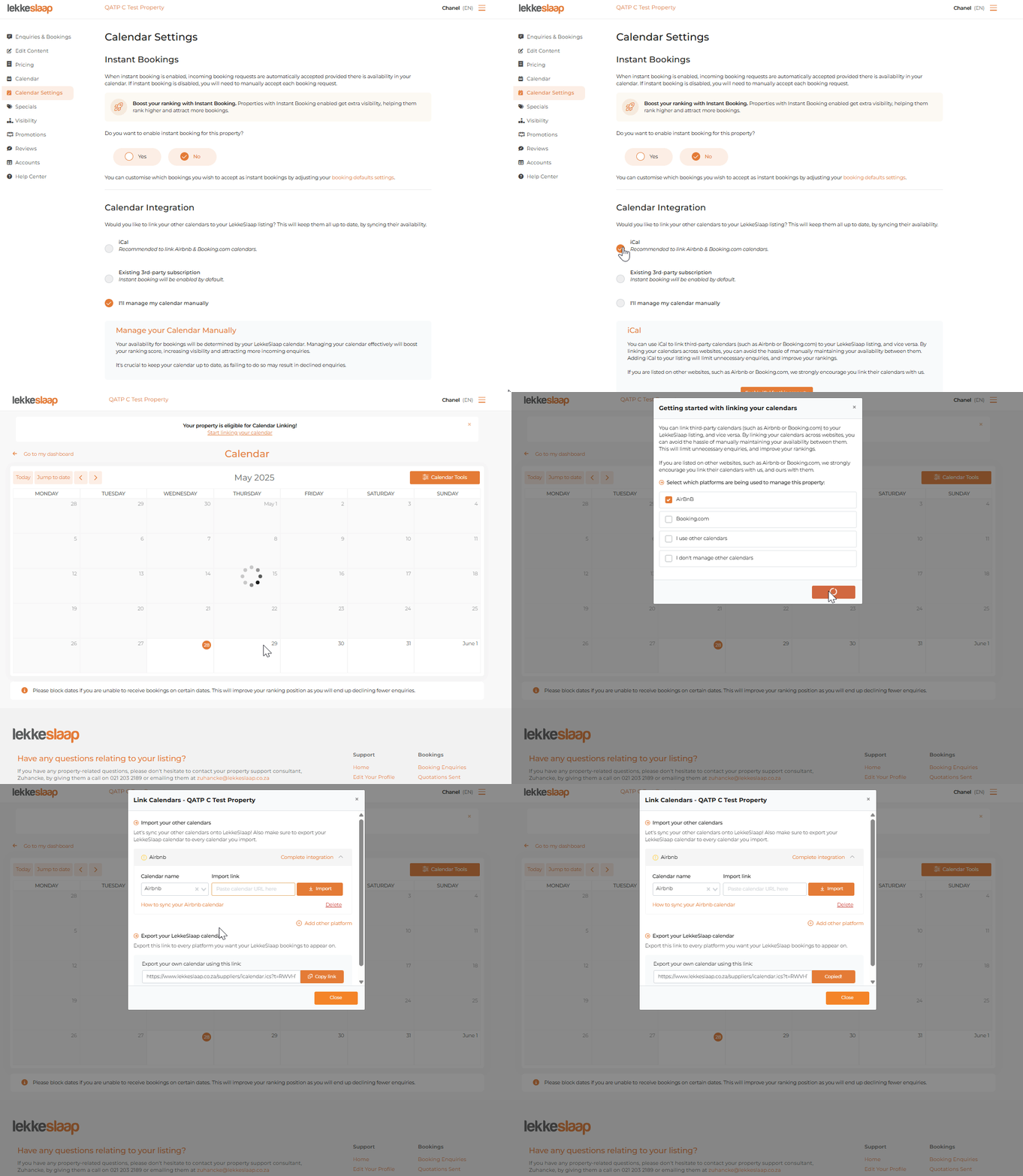
You’ve successfully linked your calendars!
Any bookings or blocked dates on Airbnb or LekkeSlaap will now sync automatically. This means fewer manual updates and more peace of mind.
Please note: It can take a few minutes for updates to reflect across both platforms.